Rotating shift calendar and weekly planner
Check whether you work on a particular date, download four weeks of shifts to your calendar and work out when to leave for a school pickup after your shift.
· 2brain
Rotating shift calendar calculator
Will you be working on the day of an appointment? Choose the first day of a run of shifts. For a 4-on, 2-off pattern, enter 4 workdays and 2 days off. The same cycle repeats before and after that date.
Enter both dates and between 1 and 365 days for each block.
Work out when to leave your shift
Download the weekly shift planner and worked example (PDF, US Letter)
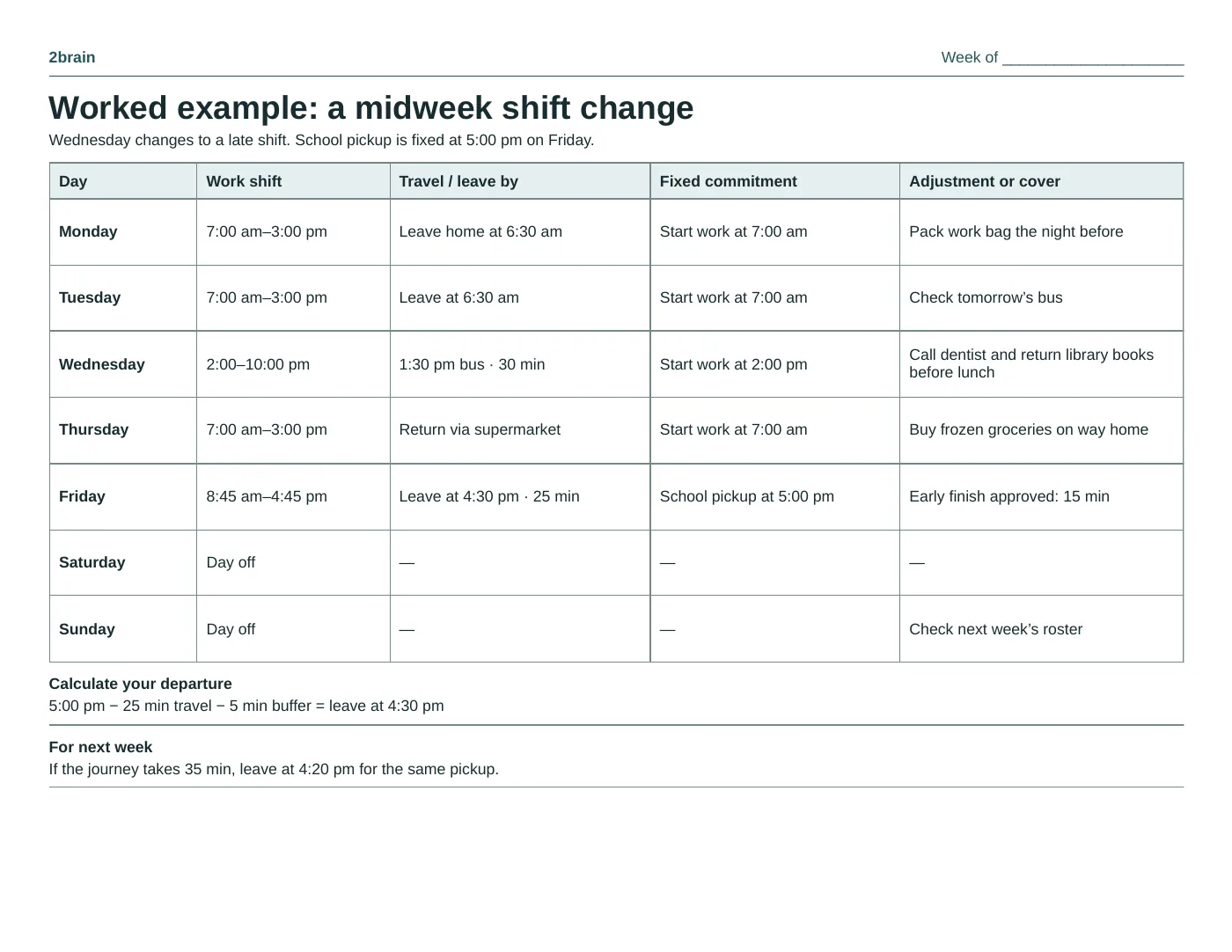
Put departure time on the calendar
If it takes 25 minutes to get from work to school and you want five minutes to spare, mark 4:30 p.m. as your departure time. A shift ending at 4:45 already overlaps pickup. You now know exactly what to ask for: leave 15 minutes early or arrange for someone else to collect.
Work backward from the start of a shift, too. If Wednesday starts at 2 p.m. and the bus takes half an hour, the time just before two is already spoken for. Block out the ride.
Fit errands to the journey
Suppose the Wednesday change frees up your morning. Call the dentist when the office opens and return your library books on the way to the bus. Picking up frozen groceries on that same trip would mean another journey home. Save the shopping for the way back on Thursday.
You can set a mobile reminder in 2brain for the time you need to leave for school. If someone else confirms they can do pickup, change the reminder then and there. That saves two people making the same trip on Friday.
Keep one useful number for next week
Compare the actual journey with the time you allowed. If it took 35 minutes because buses run less often at the end of that shift, use 35 minutes for the next pickup. The roster may change again, but you have a better estimate for that route.