AI planner: your plan for today, ready every morning
In 2brain, the AI prepares your plan for today every morning, at the time you choose. It starts from your routine, tasks, habits and diary. You read it, change what you want and decide. It is included in the Complete and Pro plans.
Updated: November 19, 2026
How does an AI planner work?
An AI planner doesn't ask you to fill in every hour by hand. You give it what you already have, like your routine, tasks and habits, and it suggests how to spread them over the day. In 2brain, it goes like this:
- Add your routine: when you wake up, when you go to bed and what a normal day looks like.
- Add your tasks and habits, the same way you would in any to-do list.
- Turn on "Get your plan for today," then pick the time and the days you want to receive it.
- Each morning, open your plan, read it and change whatever doesn't fit.
The essentials, if you feel like it and can wait
The plan is not one flat list. It splits your priorities into "The essentials" and "If you feel like it," and sets aside under "Can wait" whatever does not fit today. You can see at a glance what has to get done and what can move to another day.
Busy days
Every plan tells you whether it is a light, regular or busy day. When the day is packed, it says so: "Today is tight: focus on the essentials and leave the rest for another day."
Start with your routine
A plan comes out better when the app knows what your normal day looks like. In "My routine," you set your wake-up time and your bedtime, and you add what you do during the day. You can keep it the same every day or set it up by week, and you can separate workdays from days off.
With that in place, the AI has a map of your day. The idea is to suggest time slots that already exist in your schedule, not to drop a long task into the hour you always go for a run or pick up the kids.
Which tasks fit in your day?
From 4 to 6 pm you have 120 minutes. An appointment takes 45 and you keep 15 in reserve. Enter your own tasks and uncheck any you can move to another day.
Time available · 60 min
Selected tasks · 80 min
Extra time needed · 20 min
If several tasks compete for the same slot, choose which task goes first. If a task regularly overruns, measure how long it actually takes.
Your tasks and your Google Calendar in one place
If you use Google, you can connect Google Tasks and Calendar to see your tasks and events inside 2brain. That data is read from Google and shown in the app. It isn't stored on 2brain's servers, and you can disconnect your account anytime from settings.
Your plan for today is built from your 2brain routine, tasks, habits and diary. Your Google events are there on screen so you can fit your day around them yourself.
Change the plan by talking to the assistant
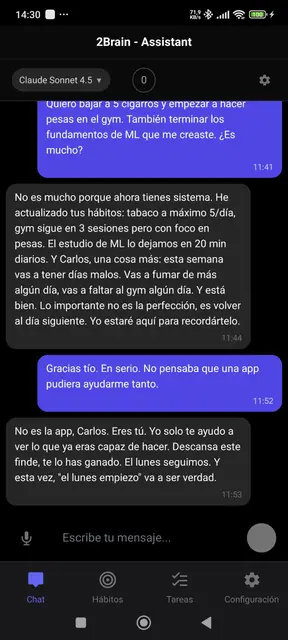
The AI suggests and you decide. If the plan doesn't work for you, you can regenerate it up to twice a day. And if you would rather explain it in your own words, the 2brain assistant is in the chat, ready for you to tell it what changed.
Chat with the assistant is part of the Trial, Complete and Pro plans. "Your plan for today" is only on Complete and Pro.
Which plans include it
- Complete and Pro: your plan for today every morning, chat with the assistant and the diary.
- Trial: chat with the assistant, without the plan for today.
- Basic: tasks, habits and categories, with no AI.
- Free: up to 25 tasks and 2 habits, with no AI.
If your plan doesn't include it, the app tells you when you open it and shows you the plans. Your tasks and habits stay right where they were.
Paper, app or AI: what changes
- Paper planner: always within reach, and it never runs out of battery, but you build the plan yourself every day.
- To-do app: it keeps your lists and reminds you, but deciding the order of your day is still up to you.
- AI planner: every morning you get a suggestion built from what you already wrote down. You review it and change it. It saves you the time of working out where to start.
If you want to separate urgent from important by hand first, try the Eisenhower Matrix. It runs in your browser with no sign-up.
To build a plan by hand, start with the daily planning guide and use the printable daily planner to give your tasks a place on the schedule.
Questions
Does the Free plan include the AI planner?
No. In 2brain, your plan for today is on the Complete and Pro plans. The Free plan includes up to 25 tasks and 2 habits, with no AI.
What data does the AI use?
Your 2brain routine, tasks, habits and diary.
Can I change the plan?
Yes. It is a suggestion. You can regenerate it, move your tasks around or talk to the assistant. You also choose the time and days you get it, or turn it off.
How many times can I regenerate it?
Up to twice a day. The next day, you get both again.
Does it connect to Google Calendar?
You can connect Google Tasks and Calendar to see them in the app. They are read from Google and not stored on 2brain's servers.
Which AI should I use to get organized when I have too many tasks?
One that sees your tasks and your routine together, so you do not have to explain everything every morning. In 2brain, that is "Your plan for today," on the Complete and Pro plans. If you would rather sort tasks by hand first, use the Eisenhower Matrix.
Get tomorrow's plan ready
More tools in Resources.